While I think that a tablet rental service is really amazing I don't see the need of having it at a baseball game. What do you think?

Friday, July 22, 2011
A tablet rental service at baseball games is a bit silly, don't you think? | PhoneDog


Wednesday, July 20, 2011
Staples offering $100 off any tablet: Ends July 30th
Don't miss this chance to get a great deal on your favorite tablet. Ends July 30th.
Hot deal: Staples offering $100 off any tablet
Hot deal: Staples offering $100 off any tablet
Lenovo Tablets

Mac OS X (10.7) Lion, Available Today
 |
| Max OS X Launchpad |
Some of these new features came to the Mac because of well they worked on the iPad. Launchpad is a new way to view all of your applications that looks just like an iPad screen. You are also able to organize your apps into folders just like on iOS.
Full-Screen Apps are also taken from the iPad. For the first time on OS X this allows you to take advantage of your full display and cut out the clutter of the dock and other apps that are open.
The Mac App Store is also new. Apple has had incredible success with the App Store on iOS with 15 Billion downloads. They have now incorporated the Mac App Store into this new OS update that allows you find the right apps for your Mac, all in one place.
Multi-Touch Gestures are a main feature in almost every iOS app. With all Macbooks having a multi-touch trackpad this makes it so most Macs can use this feature. Even if you have an iMac you can easily purchase a Magic Trackpad to allow you to use these new gestures. These gestures allow you to quickly jump to Mission Control where you see all open apps, to swiping left and right to jump between other open apps in Full-Screen mode.

Wednesday, July 13, 2011
Editorial: Are We Really Multitasking?

With the PC style of multitasking it allows you to be listening to music in the background or easily switch from a game to using the web. One of the most common forms is having a dual screen computer. This allows you to see multiple programs at once so you don't have to continually change between them while you copy information from one program to the other.
Many of the current Mobile OS platforms have elements of multitasking built in but it seems that they are still far from what we really need. From the beginning of the iPhone you could open up iPod and start your music, then you could switch to view your Calender or messaging very easily while still listening to your music. This is great but let everyone longing for more.
Now the iOS allows you to do this with all apps. You simply press the home button twice to open up the most recent apps so that you can switch from one to the other only running certain tasks like music and or location based services in the background and pausing the rest of the processing. On Android it is a similar way of doing things. When you leave an app it will keep the spot where you just were. You can then hold the home button and a list of recent apps will appear and you can then switch back to where you previously were. Android is known for running many computing tasks in the background to keep all widgets and services up to date with the greatest information.
Yes these process would fall in the line of actual multitasking, but is that what we truly are doing? Right now, look at your computer screen and see how many different windows you have open. Is there just one or are there multiple? Do you spend your time only doing one thing or is there a web browser open on one side of the screen and Word open on the other? These processes are what makes a computer so great. With this we can do much more than what a simple piece of paper could ever do for us.
On the mobile OS this is something that is still yet to be done. Recently Microsoft put out a demo of upcoming features of Windows 8 for touch screens that gives the ability to do this type of computing on a touch screen. There are certain apps right now such as Twitter on the iPad that allow you to view your stream and click on a link to open a new panel where the browser opens so you can still see your stream and view a web page at the same time. This would be great to have in tablets because of the amount of real-estate.
When Honeycomb came out I thought about what would be the one feature that I would love to have on it that iOS did not have. I thought it would be great if you were able to open two Android apps at the same time and use them simultaneously. The possibilities of combinations of apps could be anything. Maybe you want to check your bank account transactions and want to update a budget at the same time but don't want to keep switching back and forth between the apps because it is hard to remember the detailed information. Maybe you a browsing Facebook but want to be playing a casual game of Cut the Rope at the same time.
From what i have learned this is not possible yet on any available mobile OS. I have not been able to find any apps that allow you to open two specific apps at the same time. The ability to do this maybe based on the processor but this definitely needs to be put down on the Need to put in the next OS update list.
Tuesday, July 12, 2011
Woot! Motorola Xoom for $399!
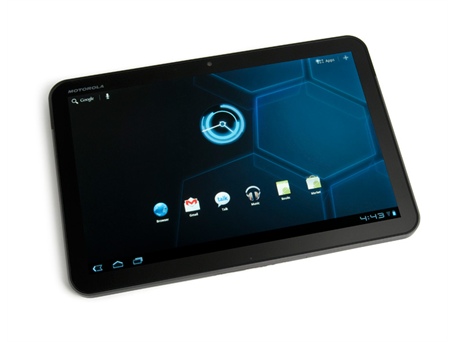
Ok, here is the deal. I have posted a few Woot tablet deals before and they were pretty good, but todays is really awesome. This is a 32GB, Dual Core, Motorola Xoom, running Android 3.1 for $399. That is $100 cheaper than the cheapest iPad and you get twice the storage plus all the amazing benefits of using a Google apps. So if you haven't bought a tablet yet, you really should, because they are awesome. Ends Thursday at midnight so get it before it is gone.
Woot® : One Day, One Deal™
Friday, July 8, 2011
Wednesday, July 6, 2011
Google+ Profiles Showing Up in Android Contacts
Today when I was going through my contacts on my Android phone I noticed that there was a new field that had not been there before. On some contacts there is only one field added and on others there are two. If you haven't heard, Google has opened up a field test of its new social networking feature called Google+. Part of this allows you to add your contacts into Circles so that you can filter to just the posts you want to read or friends you just want to contact.
There is very well going to be deep integration of Google+ into the Android OS. The Google+ app allows you to post to Circles, post pictures from your phone and check into places.
Under my Tablet in a Minute contact I had two links show up. A Google Profile link and a Google+ Profile link. Since that profile is in my Circle, that may be why it is showing up. I check other contacts who have joined Google+ and it is showing up on theirs as well. I also checked contacts that I have put in my Circles but they are not a part of Google+ and they had no link.
I think that this makes for great integration to easily be able to go to a friend or family member's profile to see their posts and info very quickly.


There is very well going to be deep integration of Google+ into the Android OS. The Google+ app allows you to post to Circles, post pictures from your phone and check into places.
Under my Tablet in a Minute contact I had two links show up. A Google Profile link and a Google+ Profile link. Since that profile is in my Circle, that may be why it is showing up. I check other contacts who have joined Google+ and it is showing up on theirs as well. I also checked contacts that I have put in my Circles but they are not a part of Google+ and they had no link.
I think that this makes for great integration to easily be able to go to a friend or family member's profile to see their posts and info very quickly.


Tuesday, July 5, 2011
Sprint updates Samsung Galaxy Tab to Gingerbread Android 2.3
Own a Galaxy Tab on Sprint? Get your Gingerbread update now.
Subscribe to:
Posts (Atom)